
May 2026 Update
May Update: Live Measurements, Redesigned Controls, and Comments in the 3D Previewer
Quick Answer: In the May update, the 3D Designer displays the actual measurements of placed elements live on the 3D model, the direct control elements on the selected element have been visually redesigned, and the 3D Previewer gets a comment feature that lets you attach feedback to exact spots on the product and ask structured questions.
In May, we've made improvements at several points in the Designer and Previewer that will noticeably simplify your day-to-day work and your customers' experience. Three topics take center stage: live measurements visible to customers directly on the 3D model, a significantly clearer display of direct control elements, and a new comment feature in the 3D Previewer for the design approval process. Plus, a technical enhancement to design templates.
How do your customers see the actual measurements of their designs on the 3D model?
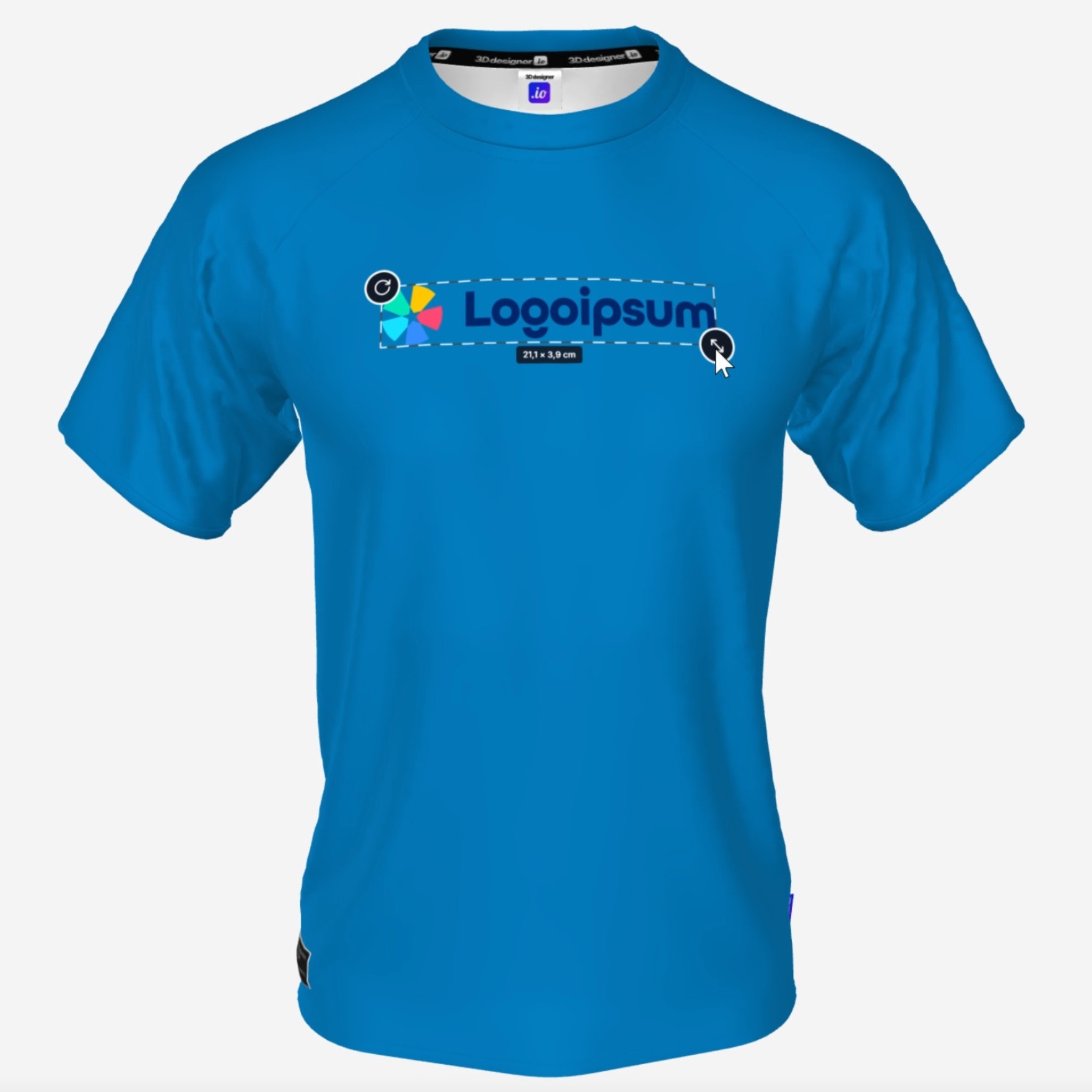
Your customers now see the measurements of their placed elements directly on the 3D model, optionally in centimeters, millimeters, or inches. Whether it's text, logo, or graphic: when placing and scaling, the actual sizes are displayed live on the model, rather than just as abstract values in the sidebar.
This way, your customers instantly know how large a logo or text will appear on the actual product. This is especially helpful for international shops with different units and avoids unpleasant surprises when the finished product ends up looking quite different from the preview.
You maintain the reference measurements of the print areas per product in the Admin Dashboard.
What has changed with the controls in the Designer?
We've visually redesigned the direct control elements on the selected element. Once an element is selected in the Designer, we now display a clearer frame with clearly visible handles for scaling and rotating.
The functions already existed, but with the new display they are immediately recognizable and easier to hit. This especially helps with quick fine-tuning of logos, texts, and patterns directly on the model.
How does the new comment feature in the 3D Previewer work?
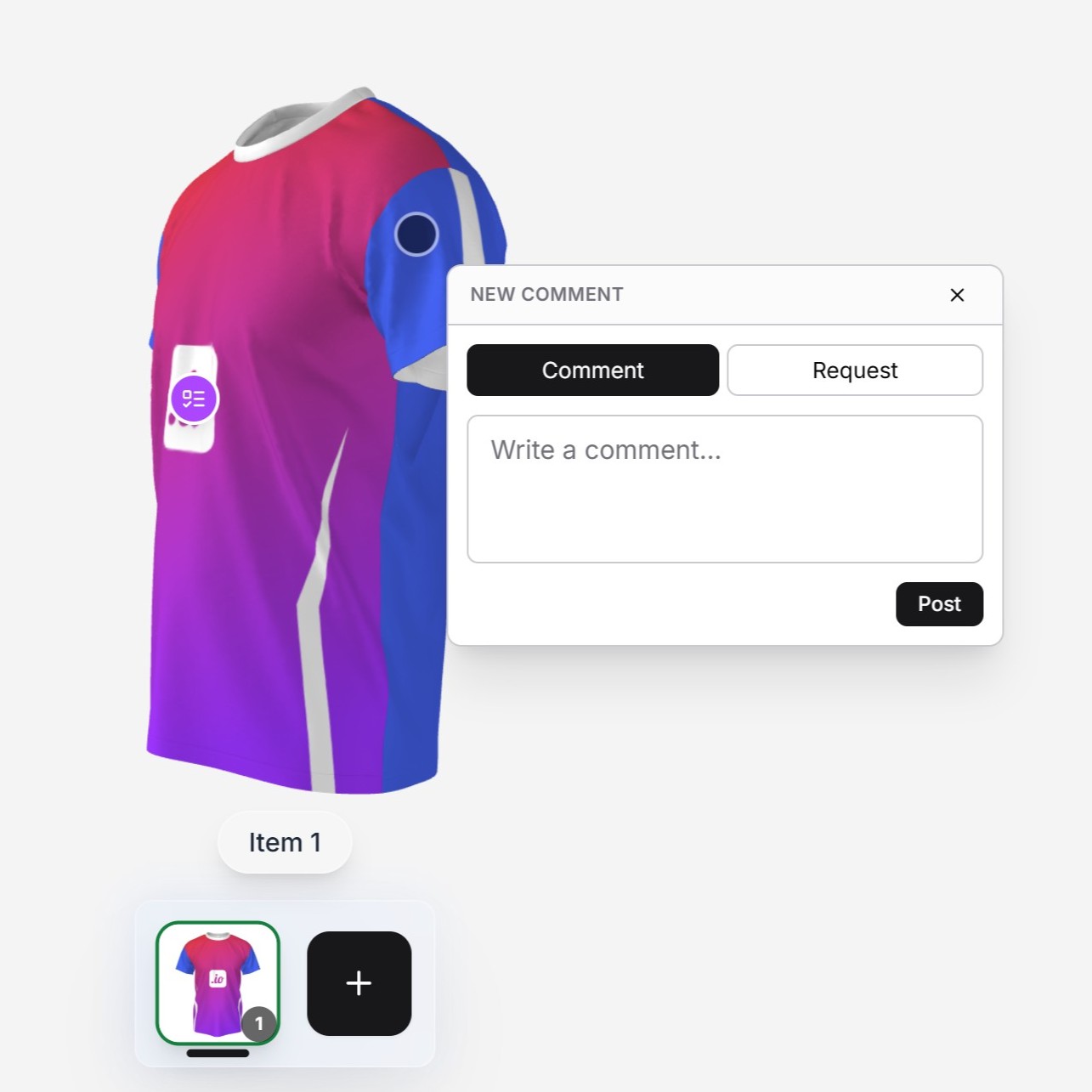
The 3D Previewer gets a new comment feature. As a designer, you can place comments directly in 3D space and attach them to exact spots on the product. Your customers see the comments at the respective position and can reply to them.
Additionally, you can ask structured questions, either as single-choice or multiple-choice. This gives you clear answers to specific design decisions, instead of a lengthy email discussion.
What are Design Templates with multiple paths?
This is a technical feature for everyone who maintains templates. Previously, a design element always consisted of exactly one path. From now on, an element can consist of multiple paths, for example element1_front, element1_back, and element1_leftsleeve.
The advantage: color gradients now apply to the individual sub-elements, meaning each path independently. You can change the orientation of the print file later without the gradients shifting or breaking. Additionally, elements can now be created with transparency.
Existing templates remain unchanged. You can create the multi-path structure per element when you need it.
Conclusion
The May update primarily makes the customer experience in the Designer and Previewer smoother. Live measurements give customers direct feedback on the size of their designs, the redesigned controls speed up editing directly on the model, and the new comment feature significantly shortens the path between design proposal and approval. Behind the scenes, multi-path templates create a technical foundation for more flexible print data.
FAQ
In which units can I display the measurements on the 3D model?
The measurements are displayed optionally in centimeters, millimeters, or inches. Your customers can switch the unit in the Designer and see the values live on the model.
Who can place comments in the 3D Previewer?
As a designer, you place comments in 3D space and attach them to exact spots on the product. Your customers see the comments at the respective position and can reply to them or answer structured single-choice and multiple-choice questions.
What happens to existing Design Templates?
Existing templates remain unchanged. The new multi-path structure is an additional option that you can use per element when you need it.
Do I need to configure anything in my shop for the new features?
Most features are active right away. You maintain the reference measurements for the print areas per product in the Admin Dashboard so the live measurements display correctly. The other functions are available immediately.