
October 2025 Update
Start Animations, Revised Product Switching, and Product Categories
October was all about user guidance and overview. Many of the changes are intentionally visual and structural, building on things we developed in the months before, particularly the new shopping cart and image-based product display.
Start Animation for Designer and 3D Previewer
Both the 3D Designer and the 3D Previewer now have a small start animation. When opened, the product rotates slightly before interaction begins.
It's not a major feature, but it noticeably improves the first impression. The entry feels more calm, the product is in direct focus, and the overall appearance feels a bit more lively without being intrusive.
Visually Revised Product Switching
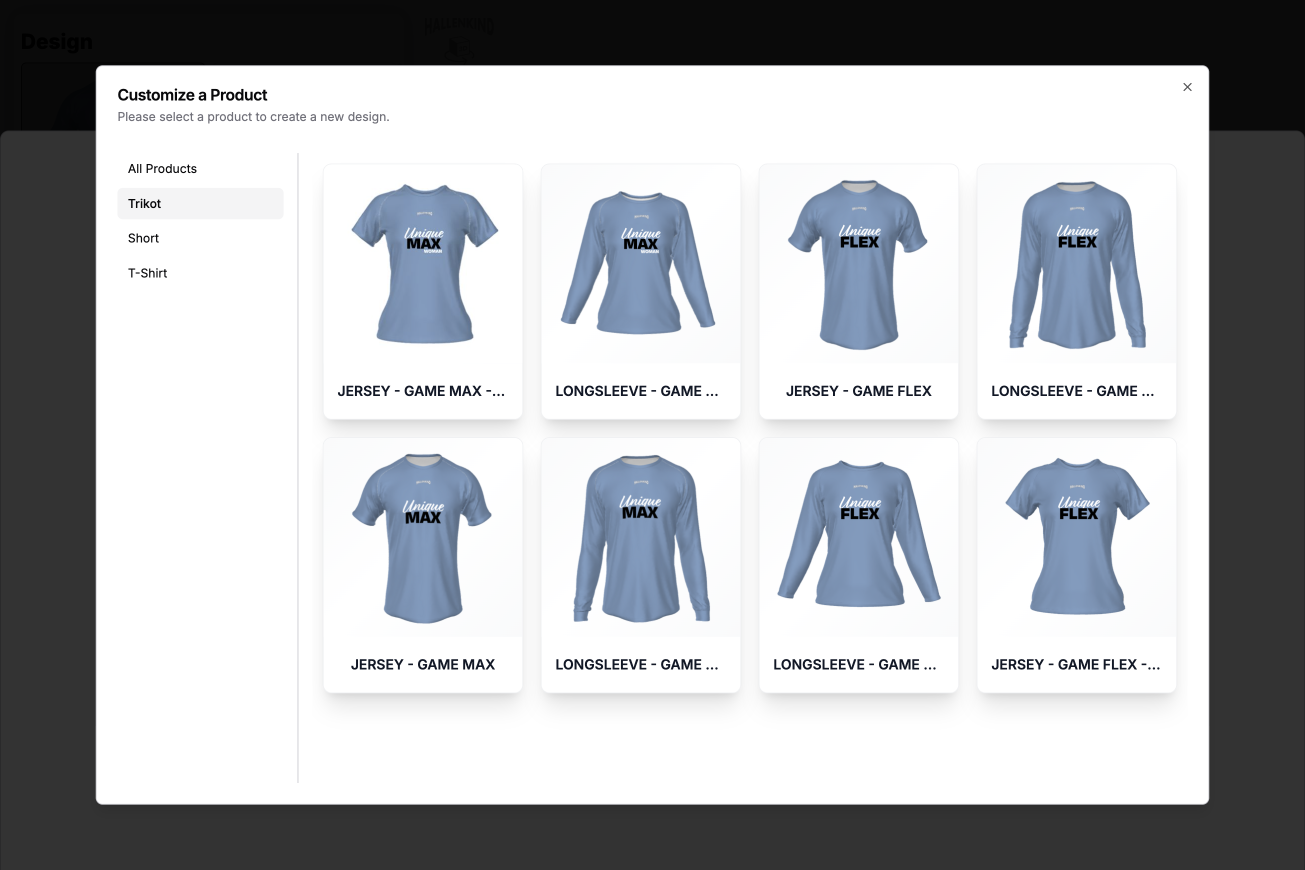
Product switching and product selection have been revised again to visually match the new image-based shopping cart better. This creates a more consistent experience and fewer visual breaks between the designer, shopping cart, and product selection.
Product Categories in Designer
Product categories are also new. Products can now be assigned to one or multiple categories.
These categories are directly available to the customer in the Designer as filters. This is especially helpful when there are many products in the range or different product types are offered. Customers find what they're looking for faster without having to click through long lists.
Conclusion
The October update primarily brings more structure and a more polished user experience. Small animations, consistent product switching, and filterable product categories make the Designer and 3D Previewer feel clearer, more modern, and more organized.